


Introduction: Why This Choice Matters More Than You Think
You’ve decided to build a website — congratulations. But before you can publish a single word or sell a single product, you need to choose a hosting plan. And almost immediately, you hit a confusing fork in the road: WordPress hosting vs web hosting. Which one do you actually need?
If you’ve spent any time browsing hosting providers, you’ve probably noticed that some packages say ‘web hosting’ and others say ‘WordPress hosting’ — sometimes at very different price points. The frustrating part? Providers don’t always explain the practical difference clearly, and that leaves beginners guessing.
Here’s what you need to know upfront: both types of hosting put your website online, but they do it in fundamentally different ways — and for different purposes. Choosing the right one from the start can save you time, money, and a lot of technical headaches down the track.
By the end of this guide, you’ll know exactly what each option is, how they compare side by side, and which one makes sense for your specific situation. Let’s get into it.
What Is Web Hosting?
Web hosting, in the most straightforward sense, is a service that stores your website’s files on a server and delivers them to anyone who visits your site. Every time someone types your web address into a browser, the hosting server responds by sending your pages, images, and content to their screen.
Think of it like renting commercial space. The server is the building, your website files are your belongings, and the hosting plan determines how much space and how many resources you get. The type of ‘space’ you rent depends on what kind of hosting you choose.
Types of Web Hosting

- Shared Hosting: Your website shares a server — and its resources — with many other websites. It’s the most budget-friendly option and works well for small sites with modest traffic. The trade-off is that if another site on the same server experiences a surge in visitors, it can slow yours down.
- VPS Hosting (Virtual Private Server): A step up from shared hosting. You’re still on a shared physical server, but your portion is partitioned off, giving you dedicated resources. More reliable and scalable, with a moderate price increase.
- Dedicated Hosting: The entire server is yours. Maximum performance, complete control, and no resource competition — but it comes at a premium. Best suited for high-traffic websites or large-scale applications.
- Cloud Hosting: Your site runs across a network of interconnected servers rather than a single machine. This means if one server experiences an issue, another takes over seamlessly. Excellent for scalability and handling unexpected traffic spikes.
Pros and Cons of Regular Web Hosting
- Pros: Compatible with any website platform — WordPress, Joomla, Drupal, Magento, or custom-coded sites. Greater flexibility in how you configure your environment. Typically lower cost, especially at the shared hosting tier.
- Cons: Less optimized for any single platform. You’re responsible for managing software updates, security patches, and backups. Support tends to be general rather than platform-specific, which means you may need to troubleshoot more on your own.
Best For: Web developers, digital agencies managing multiple client sites across different platforms, technically confident users who want hands-on server control, and anyone who isn’t building on WordPress.
What Is WordPress Hosting?
WordPress hosting is a category of web hosting that has been purpose-built and fine-tuned to run WordPress — the content management system that powers over 40% of all websites on the internet. While any standard hosting plan can technically run WordPress, a WordPress-specific host goes several steps further by configuring the server environment to get the best possible performance, security, and reliability from the platform.
The key distinction is optimization. A WordPress host understands exactly what WordPress needs to perform at its best — the right PHP version, database configuration, caching layers, and security rules — and sets all of that up by default.
Managed vs. Unmanaged WordPress Hosting
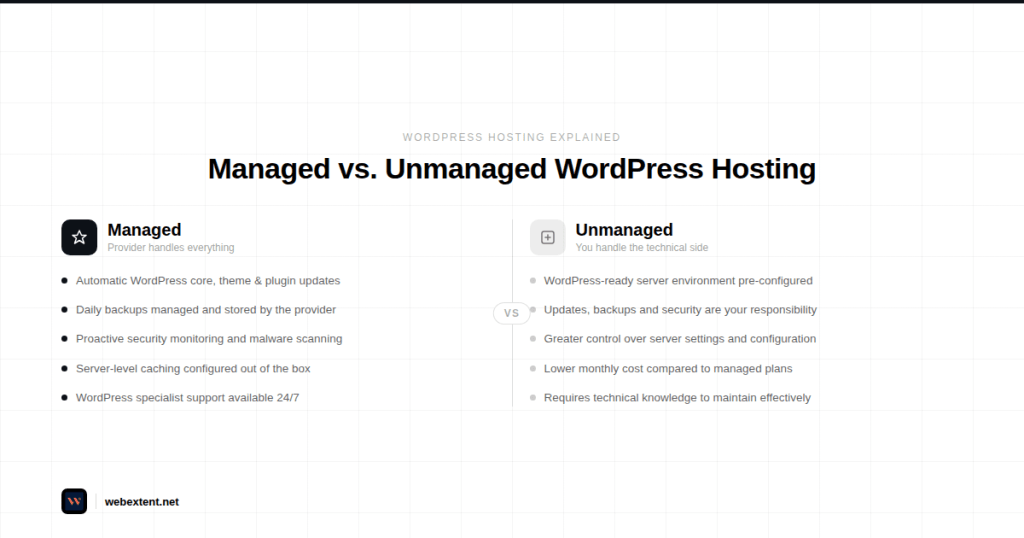
- Unmanaged WordPress Hosting: The server is pre-configured for WordPress, but you handle the day-to-day management — including updates, backups, and security. It gives you more control but requires more technical involvement.
- Managed WordPress Hosting: The hosting provider takes care of the technical side entirely. WordPress core updates, plugin updates, daily backups, security monitoring, and performance caching are all handled for you. This is the most hands-off, beginner-friendly option — and the one most small business owners gravitate toward.
Key Features of WordPress Hosting
- One-click WordPress installation — your site can be live in under 10 minutes
- Automatic WordPress core, theme, and plugin updates to keep your site current and secure
- Built-in server-level caching for significantly faster page load times
- WordPress-specific security rules, malware scanning, and brute-force attack protection
- Support teams who specialize in WordPress — not just general server issues
- Staging environments that let you safely test changes before pushing them live
- Pre-installed performance tools such as CDN integration and image optimization
Pros and Cons of WordPress Hosting
- Pros: Noticeably faster WordPress performance out of the box. Reduced technical burden — especially valuable for non-developers. Proactive security monitoring reduces the risk of your site being compromised. Expert support means faster resolution when something goes wrong.
- Cons: Primarily suited to WordPress sites, so it’s not the right choice if you’re working across multiple platforms. Managed plans cost more than basic shared hosting. Some managed hosts restrict certain plugins that conflict with their infrastructure.
Best For: Bloggers, small business owners, service-based businesses, WooCommerce store owners, and anyone who wants a fast, secure, and professionally managed WordPress website without needing to become a server administrator.
WordPress Hosting vs Web Hosting: The Head-to-Head Comparison
Rather than trying to hold both options in your head, let’s put them side by side.
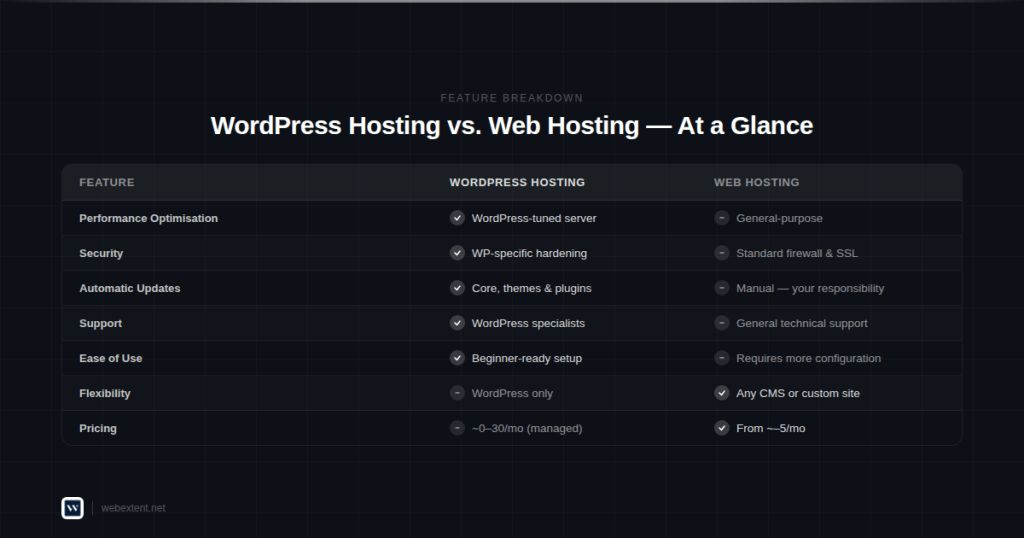
The table below covers the eight factors that matter most when evaluating your hosting options.
| Feature | Web Hosting | WordPress Hosting |
| Flexibility | Supports any CMS, framework, or custom-coded site | Optimized exclusively for WordPress |
| Performance | General-purpose; performance varies by plan | Server-level tuning for WordPress speed |
| Ease of Use | More manual configuration required | One-click install; beginner-ready setup |
| Security | Standard firewall and SSL included | WordPress-specific malware scanning and hardening |
| Support | General technical support | WordPress specialists available 24/7 |
| Pricing | Entry-level from ~$2–5/month | Managed plans from ~$10–30/month |
| Scalability | Wide variety of upgrade paths | Scalable within the WordPress ecosystem |
| Auto Updates | Manual updates — your responsibility | WordPress, themes, and plugins updated automatically |
A few things stand out from this comparison. First, web hosting wins on flexibility and upfront cost. Second, WordPress hosting wins on convenience, performance, and peace of mind. Neither is objectively ‘better’ — they’re designed for different needs. The right choice depends on what you’re building and how much time you want to spend managing the technical side.
When Should You Choose Which?
Understanding the features is one thing — knowing which option actually fits your situation is another. Here are some practical scenarios to help you decide.
Choose Regular Web Hosting If:
- You’re building a website on a platform other than WordPress — such as Joomla, Drupal, PrestaShop, or a fully custom-coded site
- You’re a developer or agency managing multiple client projects across different CMS platforms
- You’re comfortable managing server-side tasks like updates, backups, and security configurations yourself
- You need maximum flexibility to install custom software or modify server settings
- Your primary goal is keeping hosting costs as low as possible, and you’re willing to handle technical maintenance in exchange
Choose WordPress Hosting If:
- You’re building your website on WordPress — which, for most beginners and small businesses, is exactly the right platform
- You want a fast, well-optimized website without spending hours configuring server settings
- You’re running an online store powered by WooCommerce and need reliable, high-performance hosting
- You’d prefer to focus on your business rather than maintaining your website’s technical infrastructure
- You want automatic backups, managed security, and expert WordPress support included in your hosting plan
In practice, the majority of small businesses, bloggers, and entrepreneurs building on WordPress will be better served by managed WordPress hosting. The time saved and peace of mind gained typically outweigh the slightly higher monthly cost.
Common Misconceptions — Answered Plainly
Can WordPress run on regular web hosting?
Yes, it can. WordPress is software, and it will install and run on any hosting plan that supports PHP and MySQL — which most standard hosting packages do. However, running WordPress on generic hosting means you’re missing the performance optimizations, automatic update management, and WordPress-specific security features that come with a dedicated WordPress environment. It works, but it’s not ideal for the long term.
Is WordPress hosting required to use WordPress?
No — it’s not a technical requirement. But it’s worth reframing the question. The real issue isn’t whether WordPress will run on regular hosting; it’s whether it will run well. A WordPress-optimized server typically delivers measurably faster load times, better uptime reliability, and stronger protection against common WordPress vulnerabilities. For most users, the difference in day-to-day experience is noticeable.
Is WordPress.com the same as WordPress hosting?
WordPress.com and WordPress.org (self-hosted WordPress) are two very different things, and confusing them is extremely common. WordPress.com is a hosted platform run by a company called Automattic. You sign up, choose a plan, and they manage everything — but in exchange, you give up significant control over your site’s design, functionality, and monetization. Self-hosted WordPress (WordPress.org), on the other hand, means you install the WordPress software on your own hosting account and have complete ownership and flexibility. When hosting providers advertise ‘WordPress hosting,’ they mean the self-hosted, WordPress.org version.
How WebExtent Helps Clients Navigate Hosting with Confidence
For many small business owners and first-time website builders, the hosting decision is just the beginning of a longer journey. Even after choosing the right plan, there’s still WordPress to configure, themes and plugins to set up, performance to optimize, and security to maintain. Without the right support, that journey can get overwhelming quickly.
WebExtent was built for exactly this situation. As a dedicated website and hosting management partner for small businesses, WebExtent bridges the gap between choosing a hosting plan and having a fully functional, professionally maintained website — without requiring you to become a technical expert along the way.

What WebExtent Provides
- Hosting Selection Guidance: Not sure which provider or plan is right for your goals and budget? WebExtent evaluates your specific requirements and recommends a hosting solution that fits — avoiding the common mistake of over-paying for features you don’t need, or under-investing in a platform that will hold you back.
- WordPress Configuration and Setup: From the initial installation through to theme customization, plugin configuration, and performance testing, WebExtent ensures your WordPress environment is properly built from the ground up.
- Performance Optimization: Page speed directly affects both user experience and search engine rankings. WebExtent implements server-level caching, image compression, and code optimization techniques that keep your site loading quickly — even as it grows.
- Proactive Security Management: Cyber threats targeting WordPress sites are real and persistent. WebExtent applies hardening measures, monitors for suspicious activity, manages security updates, and responds quickly if an issue is detected — so you’re protected without needing to think about it.
- Ongoing Maintenance and Support: Websites require regular attention. WebExtent handles routine updates, monitors site health, performs backups, and provides ongoing support — giving you the confidence that your website is always in good hands.
WebExtent’s approach is simple: handle the technical complexity so you can focus on running your business. Whether you’re launching a new website or looking to improve the performance of an existing one, WebExtent provides the expertise and ongoing support that keeps your site competitive.
Tips for Choosing the Right Hosting Provider
Regardless of whether you go with web hosting or WordPress hosting, the quality of your provider matters significantly. Here’s a practical checklist to evaluate any hosting company before signing up.
- Uptime Guarantee: Look for a provider that guarantees 99.9% uptime or higher. Every hour your website is unavailable costs you in lost visitors and potential revenue. Ask providers how they handle outages and how quickly they resolve them.
- Quality of Customer Support: 24/7 support via live chat or phone is essential. When your website goes down unexpectedly, slow support is not an option. Test their response time before committing.
- Backup Policy: Daily automated backups are non-negotiable. Equally important is how easily you can restore a backup when you need to. Some providers charge extra for restoration — clarify this upfront.
- Security Features: As a minimum, your hosting plan should include a free SSL certificate, a web application firewall, DDoS protection, and malware scanning. For WordPress sites, WordPress-specific security hardening is an important bonus.
- Transparent Pricing: Many hosting providers advertise aggressively low introductory rates that renew at two or three times the price. Always check the renewal cost before purchasing, and factor that into your decision.
- Scalability: Your hosting needs will grow as your website grows. Choose a provider with clear, affordable upgrade paths — so you’re never forced to migrate to a new host when you start getting more traffic.
Frequently Asked Questions
1. What is the main difference between WordPress hosting and regular web hosting?
Regular web hosting is a general-purpose service that stores and serves any type of website — built on any platform. WordPress hosting is a specialized version of web hosting that has been specifically configured, optimized, and supported for WordPress. The core functionality is the same; the difference lies in performance tuning, included features, and the level of WordPress-specific expertise the provider offers.
2. Is WordPress hosting more expensive than standard web hosting?
Typically, yes — particularly for managed WordPress hosting. Entry-level shared hosting can start at $2–5 per month, while managed WordPress plans generally begin around $10–30 per month. However, the added cost reflects real value: automatic updates, server-level caching, managed security, and specialist support. For most small business owners, the time saved and problems avoided make it a worthwhile investment.
3. Which hosting option is best for complete beginners?
If you’re building a WordPress website — which is the case for the vast majority of beginners — managed WordPress hosting is the most practical and forgiving starting point. The automated management features significantly reduce the technical burden, and having WordPress-specialist support available means you can get help quickly when questions arise. It’s the option designed to let you focus on your content and business, not your server settings.
4. Can I use WordPress on any standard web hosting plan?
Yes. WordPress requires PHP 7.4 or higher and a MySQL or MariaDB database — specifications that nearly all modern shared hosting plans meet. You can install WordPress manually or through a one-click installer if your host provides one. That said, running WordPress on a non-optimized server typically results in slower load times and less targeted security than a WordPress-specific hosting environment provides.
5. Is WordPress hosting suitable for WooCommerce stores?
Yes — and in most cases, it’s the recommended setup. WooCommerce stores handle product listings, customer accounts, and payment processing, which places higher demands on server performance and security. Managed WordPress hosting, particularly plans designed with WooCommerce in mind, provides the caching infrastructure, database optimization, and security features that e-commerce sites require to perform reliably.
6. What’s the difference between WordPress.com and WordPress.org?
WordPress.com is a fully hosted service where the company manages all the technical infrastructure. Plans range from free (with limitations on customization and monetization) to premium. WordPress.org is the free, open-source WordPress software that you install on your own hosting account. It gives you complete control over your website’s design, functionality, and data — and it’s what hosting providers mean when they advertise ‘WordPress hosting.’ For any serious business website, WordPress.org (self-hosted) is the professional-grade choice.
7. Can I migrate from web hosting to WordPress hosting later?
Yes, migrating an existing WordPress site to a new host is entirely possible and a common process. Many WordPress hosting providers include free migration assistance as part of their onboarding. While the technical steps can be handled by your new host or a WordPress professional, it’s generally easier — and less disruptive — to start on the right hosting environment from the beginning rather than moving a live site later.
Conclusion: Make the Right Choice from the Start
The WordPress hosting vs web hosting debate isn’t really about which option is superior — it’s about which one is right for you. And when you understand what each offers, the answer usually becomes clear pretty quickly.
If your website runs on WordPress — whether it’s a blog, a service business site, a portfolio, or an online store — WordPress hosting gives you a meaningful advantage. Better performance out of the box, automatic updates, stronger security, and expert support all add up to a more reliable, professional website with significantly less effort on your part.
Standard web hosting, on the other hand, remains the better choice when you need flexibility across multiple platforms, want more hands-on server control, or are managing projects that go beyond the WordPress ecosystem.
Whatever direction you choose, the quality of your provider and the support available to you matters just as much as the type of hosting you select. A fast, well-maintained website builds trust with your visitors — and that trust directly influences whether they stay, engage, and ultimately become customers.
If you’d like guidance on finding the right hosting solution for your specific goals — or if you want a trusted team to handle the technical side entirely — WebExtent is here to help. From initial setup to long-term performance management, WebExtent works alongside small businesses and entrepreneurs to ensure their websites are fast, secure, and always working hard for them.
Ready to get started? Don’t let hosting decisions slow you down. WebExtent offers personalised guidance, WordPress configuration support, and ongoing maintenance — so your website launches with confidence and stays that way. Reach out to the WebExtent team today and take the first step toward a website that truly works for your business.
Subscribe to Us on YouTube
Get exclusive tutorials, behind-the-scenes content, and expert insights delivered directly to your feed.
We Are Available On:
Facebook:
https://facebook.com/webextent.net/
Instagram:
https://www.instagram.com/webextentofficial/
Twitter (X):
https://twitter.com/WebExtent


0 comments