


Choosing between WordPress.com vs WordPress.org is the most critical decision you will make when starting a new website. While they share a name and the same core software, the experience of using them is as different as renting an apartment is from owning a home.
In 2026, the landscape has shifted slightly with the introduction of WordPress 7.0, featuring advanced AI integration and enhanced “Data Liberation” tools. However, the fundamental question remains: Do you want a managed service that handles everything for you, or do you want the absolute freedom of the open-source software?
This guide will break down the differences in cost, customization, and long-term scalability to help you decide which version of WordPress is right for your project.
1. The Core Difference: Hosting and Control
The simplest way to understand the divide is to look at who is responsible for your site’s “engine.”
WordPress.com: The All-in-One Service
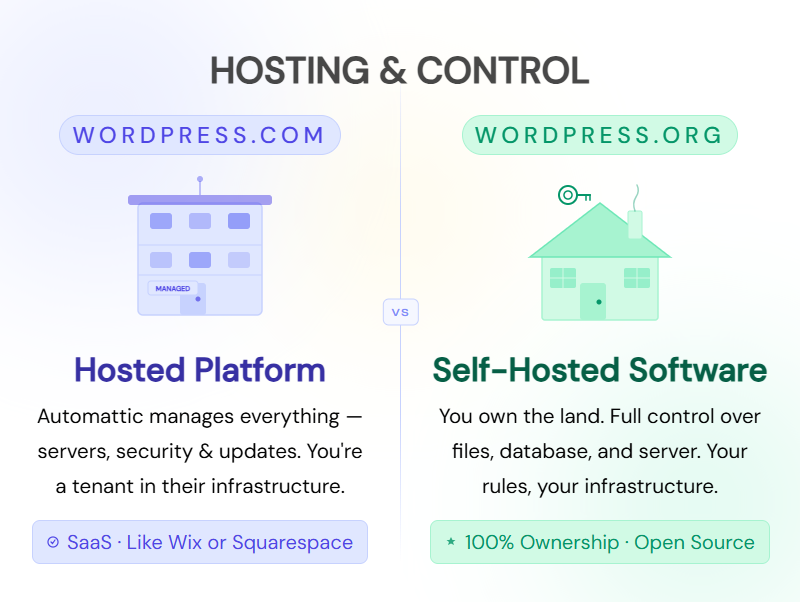
WordPress.com is a hosted platform. It is owned by Automattic (led by WordPress co-founder Matt Mullenweg). When you sign up, you are getting a service package. They provide the hosting, the security, and the maintenance. It is a “SaaS” (Software as a Service) model similar to Wix or Squarespace.
WordPress.org: The Self-Hosted Software
WordPress.org is the home of the open-source software. It is free for anyone to download, but you must find your own “plot of land” (web hosting) to install it on. Because you host it yourself, you have 100% control over the files, the database, and the server configuration.
2. Cost Comparison: What Will You Really Pay?
“Free” is a word used by both platforms, but the reality of your monthly invoice can vary wildly.
The True Cost of WordPress.com
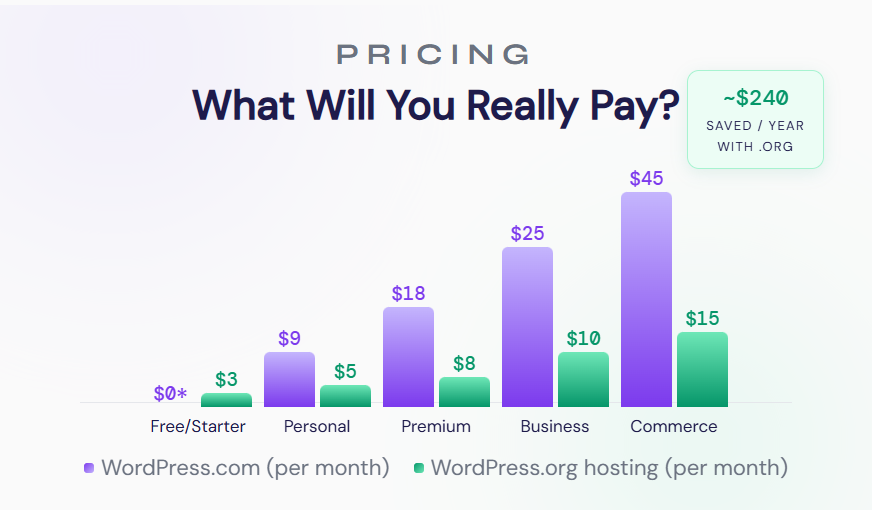
WordPress.com offers a free tier, but it is heavily restricted (you get a subdomain like my-site.wordpress.com and forced ads). To build a professional site, you’ll likely need one of their paid plans:
- Personal: Best for basic blogs.
- Premium: Adds Google Analytics and better design tools.
- Business ($25+/mo): Crucial because this is the level where you can finally install third-party plugins and themes.
- Commerce ($45+/mo): Necessary for full-scale online stores.
The True Cost of WordPress.org
The software itself is $0. However, your expenses will include:
- Web Hosting: $3 – $15/month for shared hosting; $30+ for managed WordPress hosting.
- Domain Name: $10 – $20/year.
- Premium Themes/Plugins: Optional, but typically a one-time fee or annual subscription (e.g., $59/year).
The SEO Takeaway: For a professional business site, WordPress.org is often cheaper in the long run than the WordPress.com Business plan, while offering more power.
3. Customization: Plugins and Themes
Plugins are the “apps” of your website, and themes are the “clothes.” This is where the two versions of WordPress diverge most sharply.

Limitations on WordPress.com
Unless you are on the Business plan or higher, you cannot upload custom plugins or themes. You are restricted to a curated library provided by WordPress.com. While this keeps your site secure and fast, it prevents you from using specialized tools like advanced SEO suites or custom page builders.
Unlimited Freedom on WordPress.org
With a self-hosted site, the world is your oyster. You can:
- Install any of the 60,000+ free plugins in the official repository.
- Upload custom-coded themes or those purchased from third-party marketplaces.
- Edit the underlying PHP code and CSS to your heart’s content.
4. Monetization and Ownership
If your goal is to make money, the platform you choose matters for your bottom line.

Making Money on WordPress.com
On the free and lower-tier plans, WordPress.com actually places their own ads on your site, and you don’t get a cent of that revenue. To run your own ads via Google AdSense or other networks, you generally need a higher-tier plan. You are also bound by their Terms of Service; if they decide your content violates their rules, they can shut your site down instantly.
Making Money on WordPress.org
Full ownership of the site and its data belongs to you. You can:
- Run any ad network (AdSense, Mediavine, Raptive).
- Use affiliate links without restriction.
- Create a membership site or sell digital products with no “transaction fees” paid to the platform (other than your payment processor like Stripe).
5. Pros and Cons at a Glance
| Feature | WordPress.com | WordPress.org |
| Setup | Instant & Easy | Moderate (requires hosting) |
| Maintenance | Hands-off (Managed) | You (or your host) handle updates |
| Plugins | Limited (unless on Business) | Unlimited |
| Storage | Limited by plan | Usually unlimited (via host) |
| Monetization | Restricted | Full Freedom |
| SEO | Good (Built-in) | Best (Full control over technical SEO) |
6. Which One Should You Choose?
Choose WordPress.com If:
- You are a hobbyist or a student wanting a simple personal blog.
- You have zero interest in technical maintenance or security updates.
- You have a budget for the Business plan and want a “hands-off” professional experience.
Choose WordPress.org If:
- You are building a brand or business.
- You want to monetize your site through ads, products, or services.
- You want to use specific SEO tools like Yoast SEO or Rank Math without paying $300/year for a Business plan.
- You want full ownership of your digital asset.
Conclusion: The Final Verdict
The “best” choice depends entirely on your goals. If you want the path of least resistance and don’t mind the extra cost for convenience, WordPress.com is a fantastic service.
However, for 90% of serious bloggers, small business owners, and developers, WordPress.org (Self-Hosted) is the superior choice. It offers the flexibility, ownership, and SEO potential required to thrive in the competitive digital landscape of 2026.
From domain registration to your first blog post, we build WordPress sites that convert. Ready to go live?


0 comments